Your projects. Your terminals.
One focused workspace.
TermSplit is a project-centric terminal workspace manager.
Built for agentic coding. Highly versatile for all your terminal needs.
14-day trial · 30-day money-back guarantee
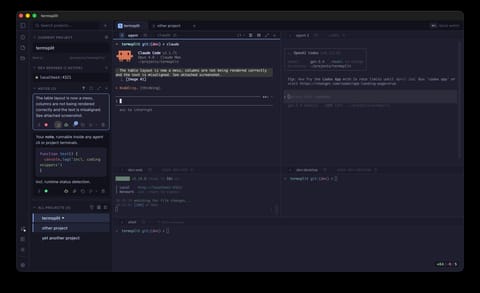
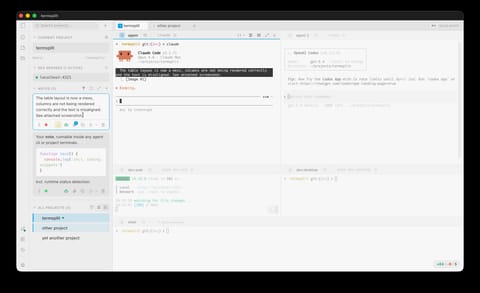


- Light & Dark mode — plus 460+ more color schemes supported
- Runs locally — your code stays on your machine
- Built on Tauri — fast and lightweight
The Problem
Terminal chaos
You juggle multiple projects daily. Your terminal setup shouldn't be extra work.
Scattered terminals
Dozens of tabs and windows with no organization. Which terminal was running the dev server? Where's the SSH session?
Manual setup every time
Open terminal. cd to project. Run dev server. Open another tab. cd again. Run tests. Repeat for every project, every day.
Context switching tax
Jumping between projects means losing your place. Terminal state is fragile and never survives a restart.
The Solution
Everything you need. Nothing you don't.
A focused set of features designed to eliminate friction when working with project related terminals and coding agents.
Project-centric workspaces
Each project gets its own saved workspace with custom pane layouts, commands, and working directories.
One-click launch
Define default commands for your panes and run them with a single click. Dev server, test watcher, coding agent — all running instantly.
Git changes at a glance
See uncommitted changes, current branch, and repo status right in the sidebar. Stay on top of your work without switching to a separate Git tool.
Project notes & snippets
Attach important notes to each project. Copy to clipboard or run directly in any terminal pane. Supports rich editing with file attachments, reordering, and categories.
Multi-window support
Open multiple TermSplit windows, each with its own project context. Perfect for multi-monitor setups.
Respects your shell config
TermSplit sources your .zshrc, .bashrc, and shell profiles automatically. Your aliases, functions, environment variables, and prompt theme work out of the box — no reconfiguration needed.
Agent agnostic
Run any — or multiple — coding agents. TermSplit tracks their status by interpreting their CLI outputs. Run notes in your project-related agents with a single click.
Still a terminal
In the end, TermSplit is an orchestration layer. If you need it, it's there — and if you don't, it falls back to a simple terminal.
460+ supported themes
Light and dark modes with hundreds of community color schemes. Find your perfect look or create your own custom theme.
Powered by iTerm2-Color-Schemes
Pairs well with coding agents like
Keep agent prompts, build commands, and useful snippets in per-project notes. Run them into any terminal with one click.
Cycle tabs across windows
With cross-window tab numbering, Ctrl⌥← / → cycle through every tab in every window. Ctrl⌥1–9 jumps directly to any tab. The right window comes to focus automatically.
Pricing
One price. Yours forever.
Pay once, use forever. No recurring fees, no account required.
Launch offer — limited time
one-time payment · lifetime updates
- Lightweight desktop app
- Use on all your Macs
- All future updates included
- No account required
Available soon
FAQ
Frequently asked questions
Which platforms are supported?
TermSplit is a native macOS app (Apple Silicon), built with Tauri and Rust for fast startup and minimal resource usage. Windows and Linux support may be added in the future.
Is there a free trial?
Yes! Download TermSplit and use it free for 14 days with no restrictions. No credit card or account required. After the trial, purchase a license to continue using it.
Is this a subscription?
No. TermSplit is a one-time purchase of €72 (currently €54 during our launch offer). You get lifetime updates. No recurring charges, no accounts, no telemetry.
How does the license work?
After purchase, you receive a license key by email. Enter it in TermSplit to activate. One license covers all your personal devices.
How is this different from tmux?
tmux is a TUI-based terminal multiplexer that requires config files and key bindings. TermSplit is a GUI app that organizes terminals by project. No config files, no learning curve — just click a project and your workspace is ready. They can complement each other.
Where is my data stored?
All configuration is stored locally on your machine. TermSplit desktop has zero telemetry, no analytics, and never sends data to external servers. Your projects and settings never leave your device.
Can I use my own terminal emulator?
TermSplit includes a fast, built-in terminal emulator powered by XTerm.js with full theme support. It’s designed to be good enough that you don’t need to switch. For edge cases, you can always open your project folder in any external terminal.
What is TermSplit built with?
TermSplit is built with Tauri and Rust on the backend for a lightweight, native app that starts fast and uses minimal resources — no Electron, no bundled browser. The terminal emulator is powered by XTerm.js, the same engine behind VS Code’s integrated terminal. The UI is built with React and TypeScript.
Does TermSplit work with AI coding agents?
Yes! Run any AI coding CLI in one pane alongside your dev server, tests, and logs — all visible at once. This is the workflow TermSplit was built for.
What if I’m not happy with my purchase?
We offer a 30-day money-back guarantee, no questions asked. Email us and we’ll process a refund immediately.